Contacts
Introduction
The first data entry point in the Intake System is to create a Contact record. A Contact record has information about the person who contacted the service, particularly the purpose of contacting. If an assessment is required, the Contact is then converted to a Client record.
For information about contacts created by the Medicare Mental Health national website see Callback requests.
Creating a contact
On the main page of the intake system is the New Contact button.

This displays a pop-up screen to collect the details about the contact.
Note: You don't have to record the consumer's details. The call may be on behalf of another person. The contact type should describe the person calling, not the person on whose behalf they are calling. This may need to be updated to the consumer’s details if the contact is converted to a client record however.
Completing a contact
A Contact record will remain in the Incomplete contacts list on the main screen until it is completed. There are two ways to complete a Contact:
- Open the Contact record, enter values in the Pathway, Contact type, Nature/purpose of contact and Outcome fields, and save the record. As soon as it's saved, it will disappear from the incomplete contacts list.
- Convert to a Client (see next section below).
For those contacts who need information, require a call-back, or no longer wish to proceed, their outcome needs to be recorded. This is useful in reports, for understanding who is contacting the service and why.
If the Contact is converted to a Client then the outcome is automatically set to “Converted to Client” by the system.
Notes
Once a Contact is saved for the first time, notes can be added to the record.
To create a note, click the "New note" button and fill in as required. Click the "Save" button at the bottom of the Contact screen to save the note.
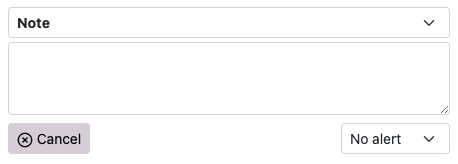
Different types of notes can be added. The note types that show by default are:
- Note
- Callback attempt
Another note type called "Summary" is available. There can only be one Summary note entered, and it will always appear at the top of the list of notes. If your team would like this note type, send in the request to pmhcis.support@nwmphn.org.au
The system logs the date/time a note is created and changed and which user made the change. To see the change history, click on the underlined date next to the note type:

You can control the notes you see by clicking the link at the top right of the notes list. It will indicate that you can show all notes or show the most recent note. Filter buttons are at the top of the list so you can filter by the note type.
Alerts
Each note can have a Low or High alert. The alerts are flagged when the Contacts are listed. If the contact has a High alert, the row will be coloured red. If Low, it will be coloured yellow. If alert notes are present, a link appears at the top of the Contact screen to filter the list of notes immediately to the alert notes.
Legacy note field
An earlier version of the Contact screen included a "Notes" field. This is now hidden by default. If information was entered in this field, it automatically displays in the list of notes as a "Legacy note". This note type can't be edited.
There is a configuration that enables this field to be displayed. If you would prefer to see this field, send in the request to pmhcis.support@nwmphn.org.au
Print contact
Click the "Print" button to view a print-friendly view of the full Contact record. It will automatically activate your computer's Print function. On the right-hand side of the page is a "Copy URL" button. This can be used if you need to send a link to the Contact to someone else.
Converting contacts to clients
If the person needs to be assessed and referred and they are comfortable to proceed (and they have not previously engaged with the service), their Contact record needs to be converted to a Client record.
First check to see if they have contacted the service before (there may be an existing contact) or have a previous consumer file within the PHN's available Client Information Management System (CIMS). Refer to Consumers re-engaging after discharge > Process for multiple referrals within a client record.
To convert, the Contact record must have values for these fields saved:
- First name
- Last name
- Date of birth (enter 9/9/9999 if unknown)
If these fields are present, the Convert button will appear.

When the Convert button is clicked, you will be asked to confirm that you wish to proceed. If you proceed, the Contact record will automatically be updated with an Outcome of "Converted to client" (and if the Nature/purpose of contact field is not entered, it will be set to "Mental health assessment"). From this point in time, the Contact record can no longer be updated. The system will also automatically create a Client record and a related Referral record. Some of the information from the Contact record is used to pre-fill data in the Client and Referral screens.
IAR-DST note templates
You can select an IAR-DST note template when converting a Contact to a Client. At the point of conversion, and if a template is set, then it will be applied to the notes for the IAR-DST domains in the Referral screen.
If an organisation that your user account belongs to has created one or more templates, you can set your default template. To set the default, go to your Profile Details screen. Then choose a template in the Default IAR note template field and then click Save.
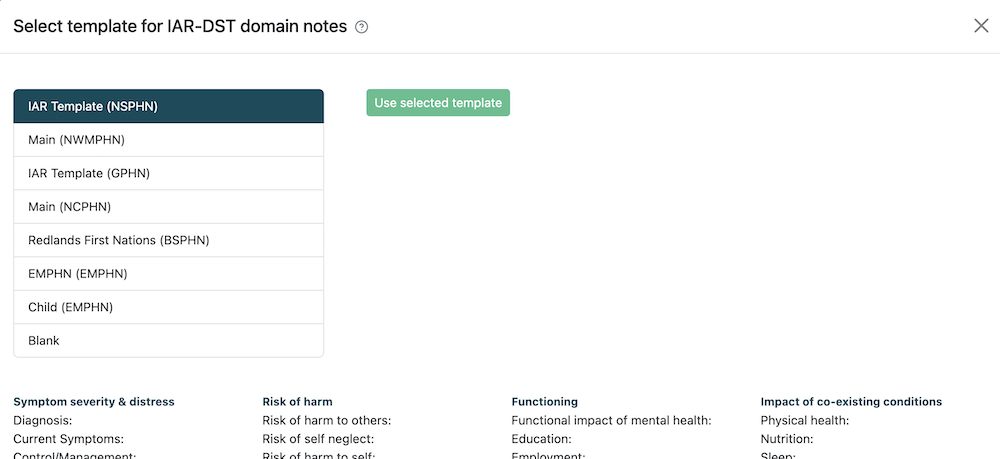
Some organisations have multiple templates. The system enables you to override your default template and choose a different template when you convert to a Client. You can preview your templates or select a blank template.
The screenshot below shows an example of what the IAR-DST template chooser looks like. If you would prefer to see the IAR-DST template chooser when you convert, switch on the Enable IAR template selection field and click Save.
Third party callers
Third party callers are those who are seeking help information on behalf of a person they are supporting. In most cases this would be considered a service navigation call which is recorded as a contact in the webform.
When receiving a call from a third party for intake to a service:
- Ask the caller to provide the Medicare Mental Health contact information to the person they are supporting and encourage the consumer to call directly in order to complete the IAR-DST, or ask if they have consented to be contacted directly by Medicare Mental Health.
- It is important that where possible an IAR-DST is completed with the consumer directly, in order to obtain informed consent and a true picture of their individual’s experience.
- If the consumer is not providing consent, the support navigation with the caller may continue, but the notes will remain recorded as a contact, and the IAR-DST cannot be completed.
- If the caller is calling on behalf of an underage child, or someone they are guardian/ power of attorney for, then an IAR-DST can be completed based on their knowledge of the child/consumer.
Callers from another PHN intake catchment
If a caller is from another PHN catchment area, and they contact your intake team:
- In the first instance, when a person residing outside of your PHN catchment, they should be warm transferred through to the appropriate local intake team to complete the IAR-DST (see phone numbers of the intake teams below). Please do not ask them to call 1800 again and put in the correct postcode.
- If the warm transfer can’t be completed, then the consumer can be given the choice of either leaving a message with the correct local intake team or having the IAR-DST completed with the out of catchment intake team and then transferred across to the local intake team should follow up/ referral be required.
Callers seeking service from another PHN catchment
Preferably, an intake should be undertaken with a consumer by the PHN/ hub intake where the person resides. The reason for this, is that is a person is not eligible for the Hub, then the intake will have a better understanding of other local services appropriate for the person based on their presentation.
If the caller is requesting support in a hub in another PHN catchment, the intake worker can liaise with the appropriate PHN intake team to discuss hub eligibility, and support the transfer of the IAR-DST if appropriate.
If the consumer is to be navigated to services other than the hub, the intake who has undertaken the IAR-DST can liaise with the other PHN intake to discuss local referral pathways or available support services if additional referral options are helpful for navigating that consumer.
In the event that the consumer cannot afford/ access similar service, so eligible for the hub, however the hubs within catchment do not have capacity (and are operating a wait-list) the intake team should be looking at other local support options, such as Stepped care services, general counseling options, bulk billing Better Access Providers, in preference to looking to other hubs out of catchment, in the first instance.
Hubs in other PHN catchments should only be considered when they are the most appropriate options for the consumer- for example, it is local to their place of work, or significantly closer to their home address.
Callers routed to an out of catchment Medicare Mental Health intake
At times, callers may be routed to an out of catchment PHN due to all staff being on calls within their local intake.
The caller should be advised that you are happy to complete the intake, however, you may not be fully cognisant of the local services, so you can arrange for the appropriate area to call them back to complete the IAR, or you can do your best to complete the intake at that time
Please do not ask the caller to ring 1800 again, and enter a new postcode.
If the person is requesting for the intake to be completed with their local intake, It is also vital that an initial risk assessment is completed with the consumer prior to requesting this call back, so there is no delay in accessing emergency care, in the event that the person is presenting with immediate risk.
Direct numbers for Medicare Mental Health Intake
Contact phone numbers of the Medicare Mental Health intake teams are available in the National Directory, accessed from the Documents & Links menu at the top.
Users who are in the "PHN Admin" role can change the phone numbers from the Admin > Organisations menu.
Handling callbacks
Local and national Medicare Mental Health websites may have the ability to forward callback requests to the appropriate intake team based on postcode entered for follow up.
Suggested Script: ‘Good morning, I’m calling from Medicare Mental Health, a service to help people find mental health support. I'm just checking to see if you requested a call back from us recently?’
a) ‘You did? Excellent.’ (continue with call) or
b) ‘You didn't? We received a call back request in the name XXXX with number XXXXX? Is that correct? Would you like to speak to us about mental health support?’
I. ‘No, OK. Thank you for your time and best wishes. Goodbye.’
II ‘Yes’ (continue with call)
If you are unable to reach the caller, it would be expected to try and make contact on 3 separate days/ times, which may include an SMS with the contact details for Medicare Mental Health, inviting a call back if consent has been provided.
Suggested SMS Script: ‘Good morning, this is the Medicare Mental Health service, we recently received a message indicating that you would like a call back. We have attempted to reach you but have so far been unsuccessful. You are welcome to call us again during business hours from Monday-Friday on 1800 595 212 if we can be of assistance. Thank you.’
Calls to be returned
If a consumer has indicated that they would like to participate in an IAR, but they wish to do this at another time, please undertake a risk assessment to ensure there is no immediate risk for them.
Suggested Script: ‘We are able to call you back tomorrow at your preferred time to complete the assessment, can I ask about any current risk to yourself, to ensure you will be safe until we speak again?’
If the consumer is indicating a risk of suicide, self-harm, or harm to others, depending on the immanency of that risk the consumer may to supported with a safety plan, or escalated to tertiary health (as appropriate).