The Medicare Mental Health Check In (MMHCI) program provides low intensity mental health support for people experiencing mild mental health challenges or transient distress. Access to MMHCI is via the Medicare Mental Health phone service. The PMHCIS supports users to assess eligibility and determine the appropriateness of MMHCI for each help seeker. Eligible individuals are referred to the MMHCI provider, St Vincent’s Health Australia (SVHA), for treatment, including guided or self guided low intensity Cognitive Behavioural Therapy (LiCBT). Referral to the MMHCI service from the Medicare Mental Health phone service is support through API integration from the PMHCIS to SVHAs systems.
All clinical and operational questions about the MMHCI treatment services should be directed to mmhci_delivery@svha.org.au
Referring to Medicare Mental Health Check In
Determining eligibility for “Check In” a Referral Outcome option
The conditions to display Medicare Mental Health Check In (MMHCI) as a referral outcome in the PMHCIS include: 1. Client is being referred from the Medicare Mental Health phone service 2. Client is over 16 3. The Derived Level of Care (LoC) is 1 or 2 The derived LoC is the Practitioner LoC if it is provided, otherwise it is the Recommended LoC. Clinical judgement should drive the decision to refer help-seekers to MMHCI.
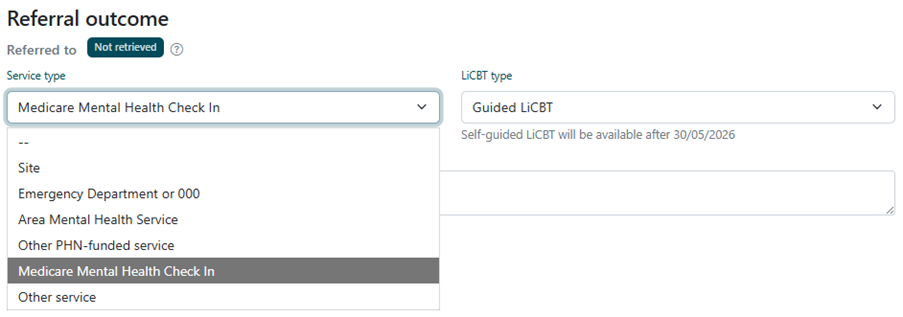
Consumers eligible for Check In
If a consumer meets the eligibility criteria for the MMHCI (Consumer is LoC=1 or 2 and 16+ years of age) MMHCI will be displayed as an option in the Referral Outcome drop-down box.
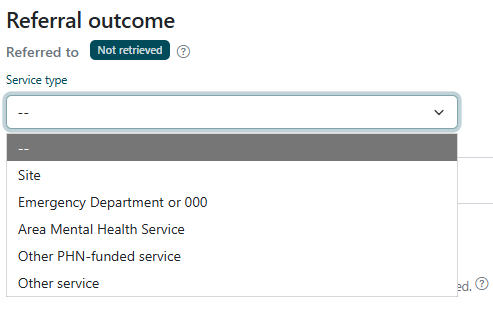
Consumers not eligible for Check In
If a consumer does not meet the eligibility criteria for the MMHCI (Consumer is LoC greater than 2 and under 16 years of age) MMHCI will not be an option in the Referral Outcome drop-down box.
Referring to MMHCI
If eligible for MMHCI, the option will need to select ‘Guided LiCBT’ or ‘Self-Guided LiCBT’. Please note Self-Guided LiCBT will be available after 30/05/2026 and cannot currently be selected.
Sending a referral to MMHCI
Once the referral outcome is selected and referral is ready, toggling the Referral to ‘Sent’ will trigger the API to pull through to the MMHCI systems. The API securely transfers the referral to SVHA – no further action is required by MMHps teams to action the referral. The Check In team will see any other referrals for the relevant client.
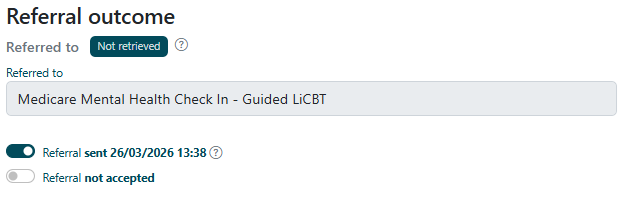
Flag to indicate API retrieval
A flag has been added above each Referral outcome to indicate whether a referral has been retrieved from by API integration.
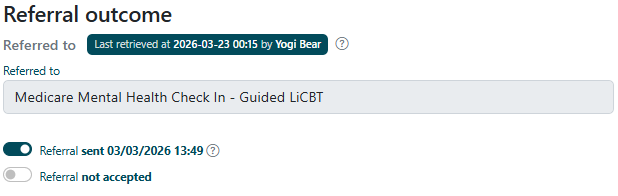
Further information is available here regarding the API retrieval flag.
Unsending Check In Referrals and Recall Referral Email
If you need to unsend a referral to Check In, you will be prompted to send a recall email to notify them. When untoggling 'Sent' for the Check In outcome, a pop-up will appear
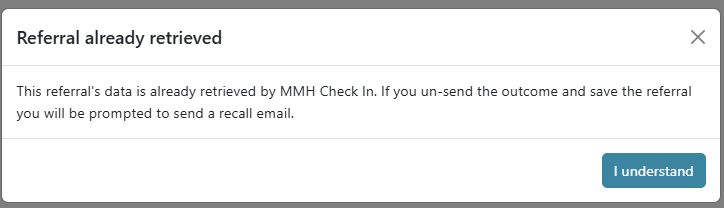
Once you progress and save the referral, the outcome will show a button to 'Send recall email'
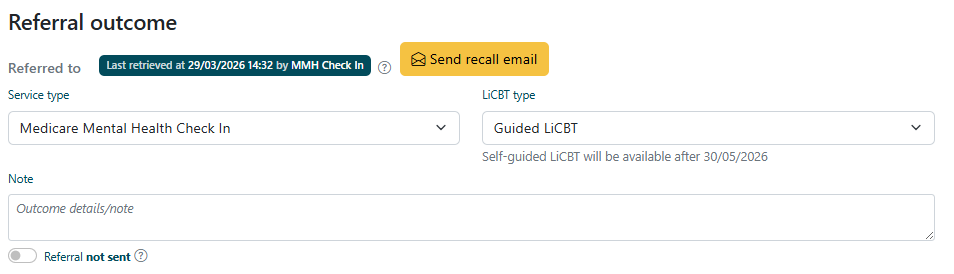
This will open an email in your emails with the following contents:
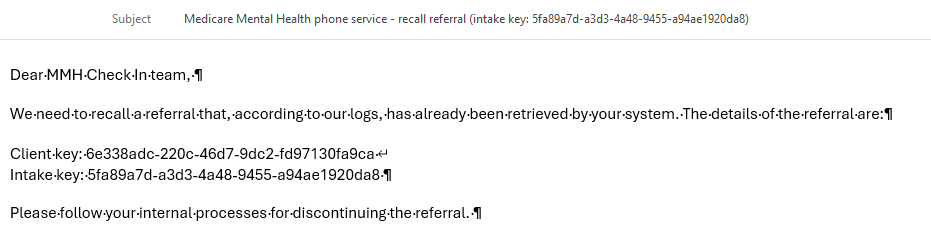
Sending the email notifies the Check In team that this referral has been recalled and for them to discontinue the referral.
Additional new functions related to MMHCI in the PMHCIS
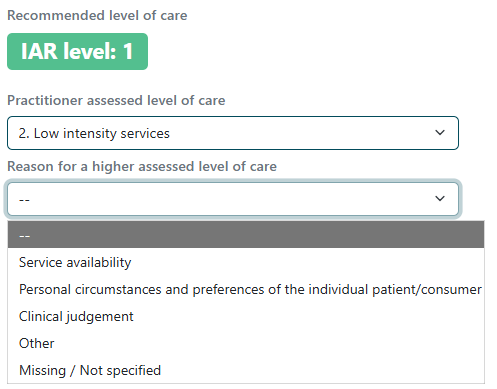
Practitioner-assessed LoC differs from recommended LoC
If the practitioner assessed LoC differs from recommended LoC i.e. recommended LoC is a 3, but clinical decision has been made to step down to a LoC 2, a rationale for override will be required as per the PMHC-MDS v5. This applies for any stepping up or down of consumers’ IAR-DST scores.
Preferred Contact Method
New fields have been added to collect preferred contact method on the client page.

Communication consent has moved locations and the options to consent to mail and email have been removed, while voicemail and SMS consent have been retained primarily for safety considerations. If the referral is sent the MMHCI and preferred contact method is not selected on the client page, a pop up will prompt users to select a preferred contact method.
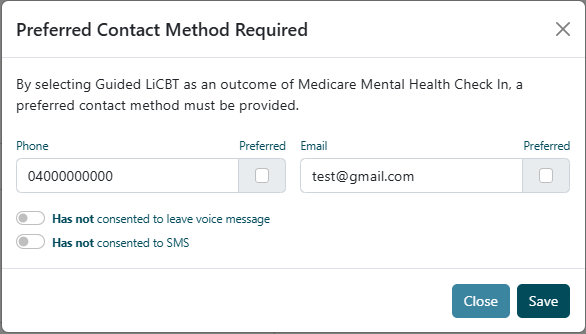
If the pop up is closed without selecting a preferred method of contact, MMHCI will automatically be removed as the referral option.
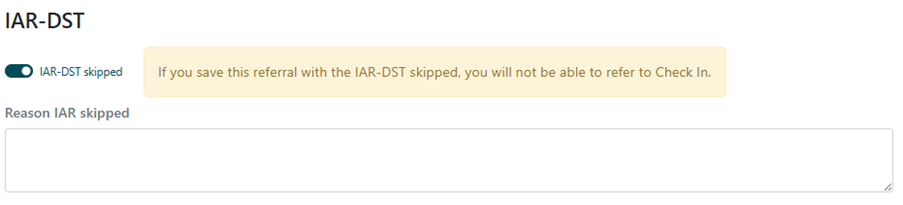
Skipping the IAR-DST and referring to MMHCI
If your organisation has the ability to skip the IAR-DST (this is an organisation setting), you will see a prompt when skipping the IAR-DST to indicate that this action makes MMHCI unavailable as a Referral outcome. An IAR-DST is a requirement for all referrals to MMHCI.