Access to your own user account settings is available from the top-right menu. Click your name, then Profile details.
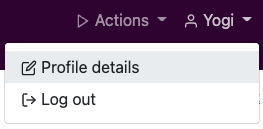
From the Profile details screen you can:
- Change your name
- Change the IAR-DST note template (if a template has been set for your PHN).
- Change your password.
- Turn on Multi-Factor Authentication (MFA).
- Change the MFA method.
Multi-Factor Authentication
MFA adds an extra layer of protection on top of username and password credentials. Once MFA is activated, you need to also supply a verification code before the login can be completed.
- In the Security section, click the button labelled Turn 2FA On.
- Choose your preferred method for retrieving the verification code. The options are an authenticator app (such as Google Authenticator) or SMS.
- Follow the instructions for setting the method up.
- Enter the confirmation verification code.
- Test that it's working as expected by logging out of your account and then logging in again. When you log back in you should be asked for your verification code.
IAR-DST note template
PHNs have the option to set a template for the note fields that are under each IAR-DST domain. A user in an administrator role can create a template or templates by clicking on Actions > Manage organisation.
In your own Profile details screen, you can set your user account to use a template (if one has been set) or none at all.