There are a number of Application Program Interfaces (API) for accessing data in the Medicare Mental Health Intake System. All access, including for de-identified data, is authorised by a verified user account log on.
Access for Client Information Management Systems (CIMS)
A crucial aspect of the Medicare Mental Health program is the ability to track a client's journey from the initial point of contact with the intake team to the final contact with their treating clinician. As there are multiple data systems in use, a mechanism needs to be in place to ensure data in disparate systems can be linked.
The only standard currently available for enabling linkage is the PMHC-MDS specification. In this specification, data is linked via the Intake Key and the treatment Episode Key. For the linking to be successful, the value of the key that identifies a unique intake/referral event must be the same as that for the consumer's treatment episode.
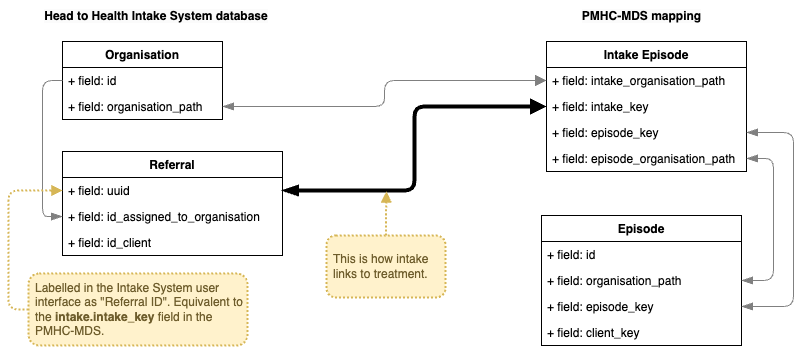
Given its importance, it is obviously better if the keys are not entered by a human. To enable automatic linkage, the Medicare Mental Health Intake System has an API for CIMS vendors to connect to, retrieve the correct data, and populate the key in their own system.
The CIMS calls on the endpoint at a frequency chosen by the vendor. The API will return a dataset containing all the intake data for organisations that the vendor's user account is authorised to access and that match the criteria set by the CIMS. The available criteria are:
- A date/time value
- The delta type. This uses the supplied date/time value to filter records based on the preferred delta type. The types are:
- Date/time Created (default)
- Date/time Changed
- Date/time Created and changed
- Date/time Sent
- Referral Status
- Organisation path/s - the default is to filter on all organisation paths that the CIMS account is assigned to.
The URL for the API combines the API functionality with the API documentation. The URLs are:
Access to de-identified data
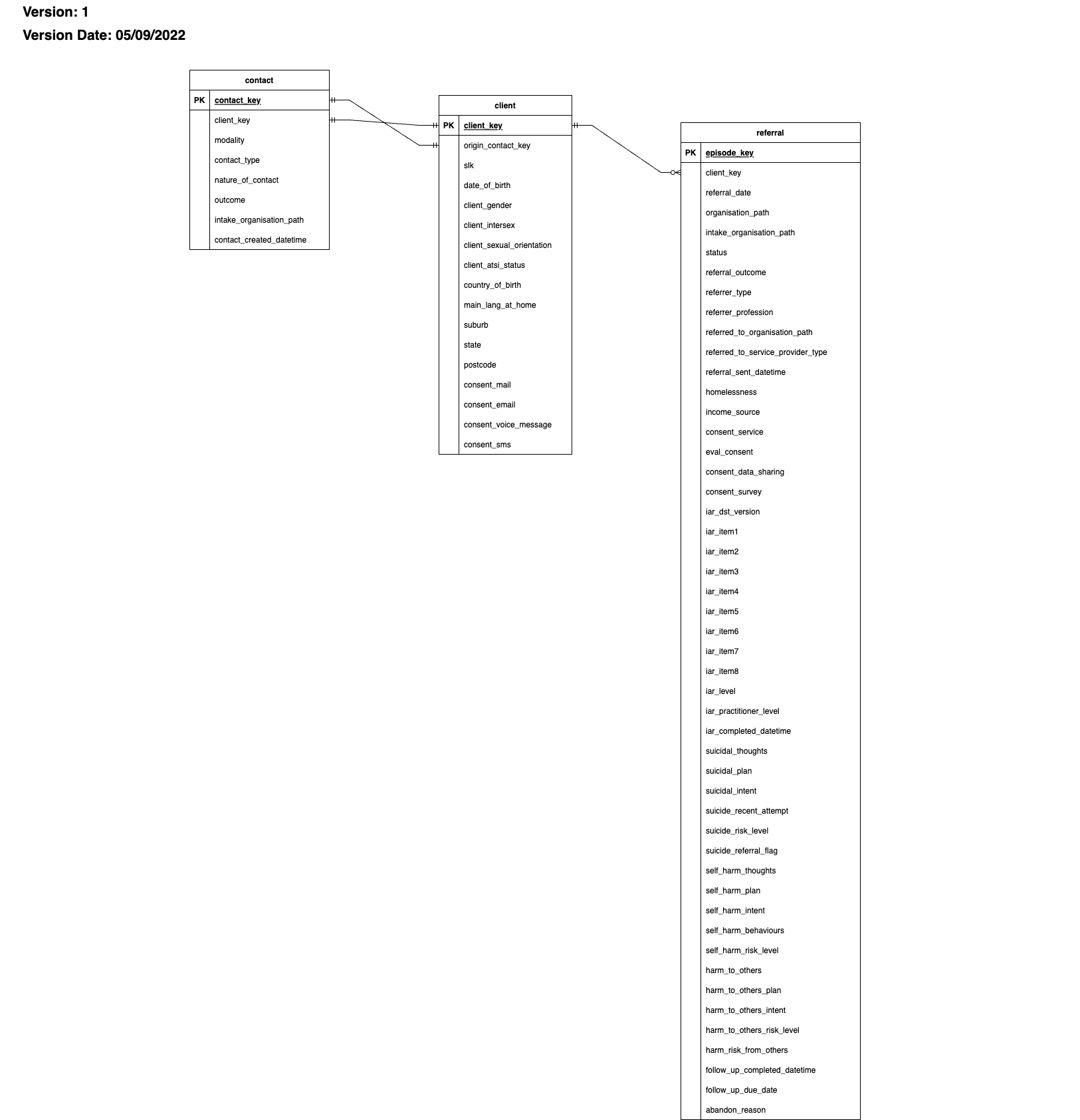
There is an endpoint for retrieving de-identified data from the Intake System. The main use case for this endpoint is for PHN data teams to access the data for their PHN so they can do their own analyses.
The endpoint returns a dataset containing de-identified fields in the Contact, Client, and Referral tables. The current data model is shown below. When the PHN calls on the API, it can choose to send through a date parameter. If a date is received, the system only returns records updated since that date.
To access the API endpoint, a Python script is available for PHNs to run. The script is stored in a repo on GitHub: h2h_intake_api_client. If you need access to this repo, contact the NWMPHN data team indvidually, or email pmhcis.support@nwmphn.org.au. Alternatively, a PHN team can develop their own method to access the API. User authentication is required, and the user account must be set up for API access in the Intake System.
Vendor Retrieval Flag
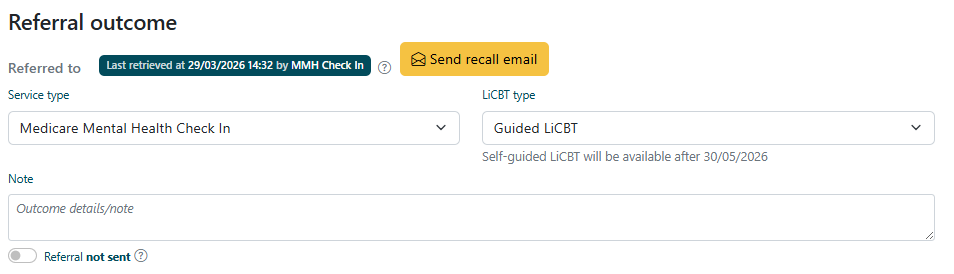
The Vendor Retrieval Flag, displayed above each referral outcome, indicates whether the referral has been retrieved by an external vendor and provides details of the most recent retrieval.
Status types: * Not retrieved Indicates that the referral has not yet been accessed by any vendor. * Last retrieved on DATE at TIME by VENDOR NAME Indicates that the referral has been successfully retrieved. The flag displays the exact date, time, and the vendor responsible for the retrieval.
Additional notes: * The flag reflects only the most recent retrieval activity. * This provides quick visibility for Intake teams to understand whether a referral has been accessed externally.
Integrator Access Log
The Integrator Access Log, located under the Logs section within the Integrator Access tab, provides a detailed history of all vendor retrieval activities.
Key information captured: * Date and time of each retrieval attempt * Vendor responsible for the request * IP address of the requesting system
Usage: * Use this log to audit and trace all access to referral outcomes by external vendors. * This is particularly useful for troubleshooting, compliance, and verification purposes.
Unsending Referrals supported with API Integration and Recall Referral Email (only for Medicare Mental Health Check In currently)
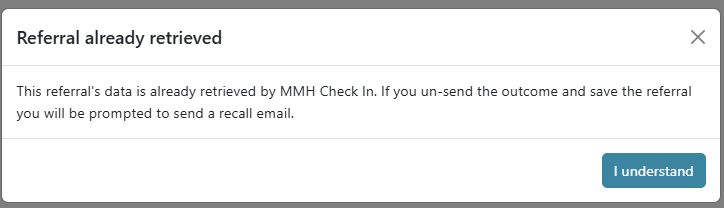
If you need to unsend a referral to a service that has API integration, including Medicare Mental Health Check In, you will be prompted to send a recall email to notify them. When untoggling 'Sent' for the Check In outcome, a pop-up will appear
Once you progress and save the referral, the outcome will show a button to 'Send recall email'
This will open an email in your emails with the following contents:
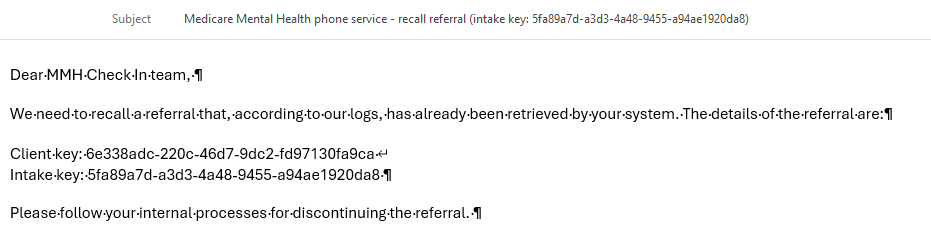
Sending the email notifies the Check In team that this referral has been recalled and for them to discontinue the referral.